No account lifts the lock
Once a snapshot is written, the storage controller rejects every change and every delete until retention has expired. That includes commands sent with administrator rights.
Home / AuraLink with ProtectionGrid / Immutable Backup
Immutable backup on the 2U AuraLink appliance, locked in the storage controller.
Attackers delete the backup first. Then they encrypt. AuraLink locks every snapshot inside the storage controller. Until retention expires, the controller rejects every delete and every change, including an administrator's.
An immutable backup is a copy that can't be altered or deleted for a fixed retention period once it has been written. Identiqa anchors that lock in the 2U AuraLink appliance with ProtectionGrid: in the storage controller rather than in the backup software, in your own rack, and mirrored to the Identiqa Cloud.
Sophos, The Impact of Compromised Backups on Ransomware Outcomes, March 2024, survey of 2,974 organizations hit by ransomware. Source
Both are sold as immutable. The difference shows only when an attacker is working with a real administrator account.
Lock in the backup software
The lock held only as long as the console was in the right hands.
Lock in the AuraLink storage controller
The command arrives and is rejected until the retention period has run out.
Simplified.
Sophos surveyed organizations after a ransomware attack and compared two groups: those whose backup the attacker reached, and those whose backup stayed intact.
Data was encrypted
Ransom was paid
Source: Sophos 2024, as above.
| Method | Deletable with an admin account? | Recovery |
|---|---|---|
| Network share or NAS | Usually, through normal administration | Fast, if it survives the attack |
| Lock in the backup software | Possible once the console or the hypervisor is taken over or the system clock is manipulated | Fast |
| Tape stored off site | No, the tape is offline | Hours to days, depending on volume and transport |
| AuraLink with ProtectionGrid | No, the storage controller rejects the command | Fast, from your own rack |
AuraLink is a 2U appliance with two Aura processors of our own. It works alongside your firewall and holds the backup copy that ransomware can't delete.
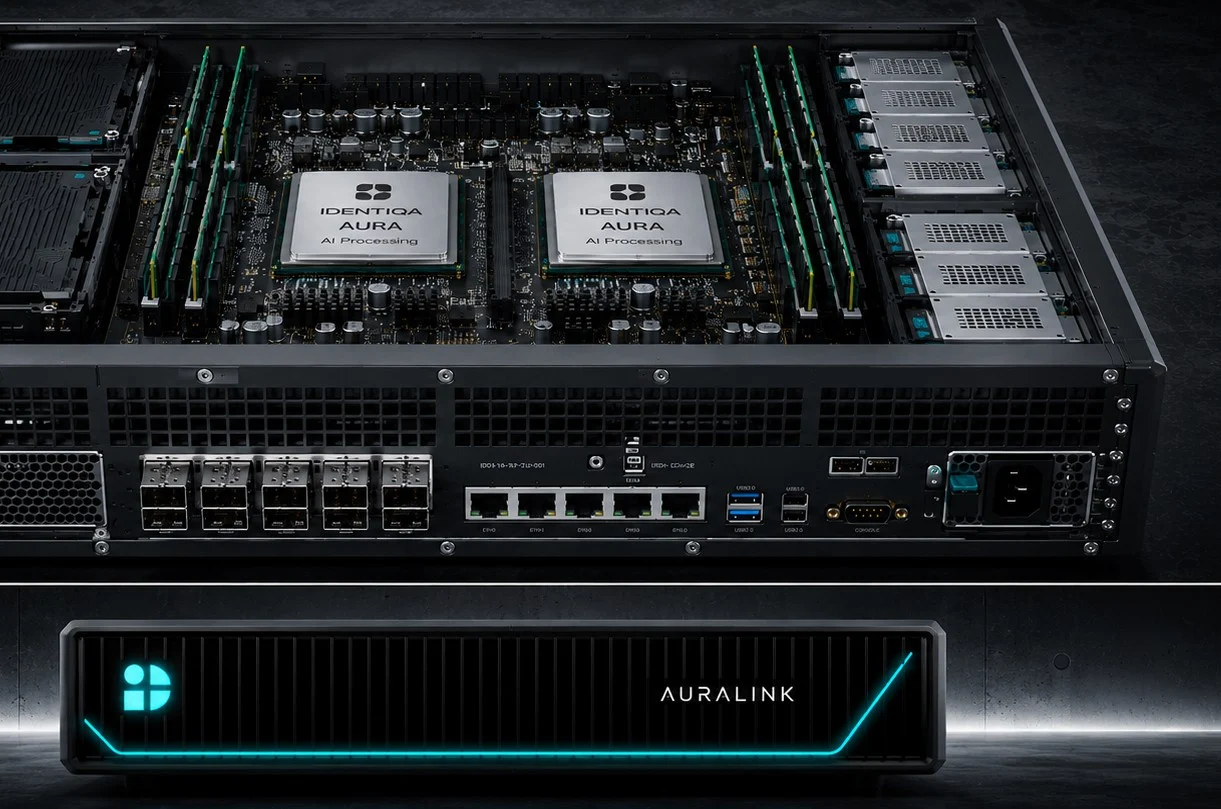
The backup sits in your rack, locked in the appliance's storage controller.
Once a snapshot is written, the storage controller rejects every change and every delete until retention has expired. That includes commands sent with administrator rights.
Before systems go back into production, AuraCore checks servers, virtual machines, Kubernetes clusters, and Docker hosts for backdoors an attacker may have left behind.
The lock record from AuraLink shows auditors and your cyber insurer that your backup was out of reach of an administrator account.
Our 24/7 incident response team guides the recovery from the locked snapshots and preserves the evidence for investigators and insurers.
In many environments the backup software shares its operating system, its time source, or its directory service with production. An attacker who gains domain admin there, or takes over the backup server, moves the system clock forward or lifts the retention period in the console.
AuraLink anchors immutability in the storage itself. Once a snapshot is written, the storage controller rejects every change or delete command until the defined retention period has expired. A copy is mirrored to the Identiqa Cloud.
The appliance has no open shell. AuraLink accepts only signed commands from a closed command list.
It helps for as long as nobody takes over the software's management plane. When the lock lives in the same console an administrator uses, an attacker with that account can shorten retention or move the system clock forward. On AuraLink the lock sits in the appliance's storage controller, outside your domain. No account from your network can lift it.
An immutable backup can't be changed or deleted until its retention period ends. An air-gapped backup is separated from the production network, so an attacker can't reach it from there. AuraLink combines an immutable backup with a logical air gap in a single 2U appliance.
Not by name. Subcategory PR.DS-11 asks that backups of data are created, protected, maintained, and tested, and RC.RP-03 asks that the integrity of backups is verified before they are used for restoration. The framework names outcomes, not technologies. A backup that a stolen administrator account can delete is hard to describe as protected.
We size Identiqa to your infrastructure and sites. Buy directly through Identiqa or on your existing agreement with Amazon Web Services, Google Cloud, or Microsoft Azure.
Architecture briefing & advisory